


|
Quantity
|
Out of stock
|
||
|
|
|||
|
|
|||
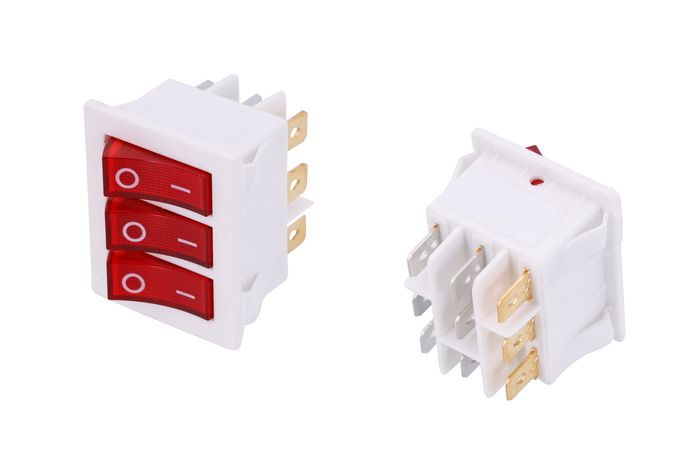
Triple network button 40312
Description: The triple network button 40312 is a reliable control element designed for use in various electrical devices. With dimensions of 28x35 mm and 9 contacts, this button ensures stable connections and dependable operation. It is suitable for both home and industrial applications. Equipped with an LED for device status indication.
Technical specifications
| Parameter | Value |
|---|---|
| Type | Control button |
| Rated current and voltage | 16 A/~250 V |
| Number of positions | 2 |
| Degree of protection | IP22 |
| Connection | Terminal 6.3 mm - 9 pcs. |
| Dimensions (HxWxD) | 34x41x37 mm |
| Mounting dimensions (HxWxD) | 28x35x29 mm |
| Material | Plastic |
| Country of manufacture | China |
Compatibility
The triple network button 40312 has a wide range of applications and can be used in various electrical appliances. Before purchasing, ensure that this button is compatible with your device.
How to choose the right part
- Pay attention to the dimensions of the button and its mounting size to ensure it fits your device.
- Check the rated current and voltage to ensure the button meets your equipment's requirements.
- Make sure the number of contacts and their configuration match your old button.
- Consider the degree of protection against moisture and dust, especially if the button will be installed in humid conditions.
Possible causes of failure
- Frequent use may lead to mechanical wear of the button.
- Overcurrent may cause damage to the contacts.
- Moisture ingress can lead to short circuits.
Methods to prevent failure
- Do not exceed the rated current and voltage during operation.
- Regularly check the condition of the button and wiring.
- Install the button in a moisture-protected location.
Replacement recommendations
- Disconnect the power supply to the device.
- Remove the old button by disconnecting the wires from the contacts.
- Install the new button in the mounting location.
- Connect the wires to the new contacts, following the wiring diagram.
- Test the button to ensure it functions correctly.
Difficulty assessment for replacement
Replacing the triple network button 40312 is a moderately complex task. Basic skills in working with electrical equipment and knowledge of wiring diagrams are required. If you are not confident in your abilities, it is recommended to consult a professional.