


|
Quantity
|
Out of stock
|
||
|
|
|||
|
|
|||
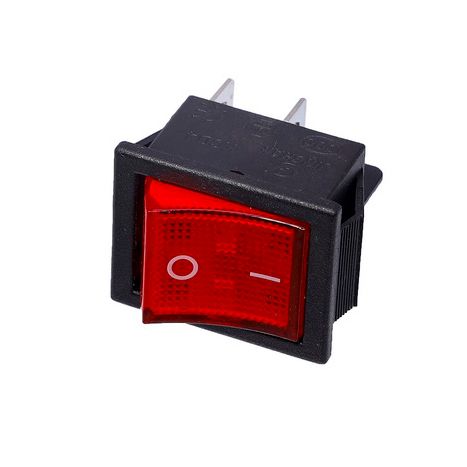
Single network button 40349 with LED
Description: The single network button 40349 is a reliable and convenient control element for various electrical devices. With dimensions of 22x28 mm and four contacts, it is suitable for operation with currents up to 16A at a voltage of 250V. This button has two positions and is equipped with an LED, providing additional convenience in use. Made from durable plastic, it has an IP55 protection rating, making it resistant to moisture and dust.
Technical specifications
| Parameter | Value |
|---|---|
| Type | Control button |
| Rated current and voltage | 16 A (20 A)/~250 V (125 V) |
| Number of positions | 2 |
| Protection rating | IP55 |
| Connection | Terminal 6.3 mm - 4 pcs. |
| Dimensions (HxWxD) | 31x26x34 mm |
| Mounting dimensions (HxWxD) | 28x22x26 mm |
| Material | Plastic |
| Country of manufacture | China |
Compatibility
The network button 40349 is suitable for a wide range of applications in various electrical devices and systems. Before purchasing, ensure that this button meets your voltage and current requirements.
How to choose the right button
- Ensure that the rated current and voltage of the button match the requirements of your device.
- Check the number of positions and their functionality to avoid improper operation.
- Pay attention to the button's dimensions to ensure it fits in the intended installation space.
Causes of failure
The button may fail for the following reasons:
- Overload due to current or voltage.
- Moisture or dust entering the device.
- Mechanical damage during installation or operation.
To prevent failure, avoid overloads, install the button in a moisture-protected area, and handle it carefully.
Replacement recommendations
- Turn off the device's power for safety.
- Remove the old button by disconnecting the wires from the terminals.
- Connect the wires to the new button according to the wiring diagram.
- Install the button in place and check its operation.
- Turn on the power and test all functions of the button.
Replacement difficulty
Replacing the network button 40349 is a task of moderate difficulty. A minimal set of tools and a basic understanding of electrical circuits will be required. If you are unsure of your abilities, it is recommended to consult a professional.