


|
Quantity
|
Out of stock
|
||
|
|
|||
|
|
|||
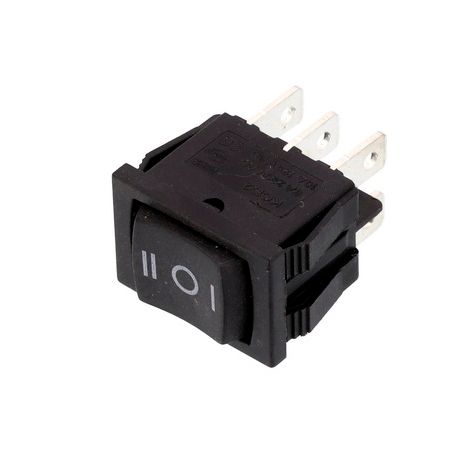
Single network button 40344
Product description: The single network button 40344 is a reliable control element designed for use in various electrical devices. It has compact dimensions of 13x19 mm and is suitable for installation in confined spaces. This button can withstand a rated current of up to 6 A and a voltage of up to 250 V, making it a versatile solution for controlling electrical appliances. The model is equipped with 6 contacts and features 3-position control, allowing for convenient operation of the device.
Technical specifications
| Parameter | Value |
|---|---|
| Type | Control button |
| Rated current and voltage | 6 A(10 A)/~250 V(125 V) |
| Number of positions | 3 |
| Protection degree | IP55 |
| Connection | Terminal 4.8 mm - 6 pcs. |
| Dimensions (HxWxD) | 21x15x27 mm |
| Mounting dimensions (HxWxD) | 19x13 mm |
| Mounting depth (excluding terminals) | 17 mm |
| Material | Plastic |
| Country of manufacture | China |
Compatibility
This button is suitable for a wide range of applications in various electrical devices. It can be used in household appliances, industrial devices, and automation systems.
How to choose the right part
When selecting the single network button 40344, pay attention to the following parameters:
- Rated current and voltage: ensure that the selected button meets the requirements of your device.
- Number of positions: check how many positions you need for control.
- Dimensions and mounting depth: ensure that the button fits the dimensions of your device.
- Protection degree: choose a button with the necessary level of protection based on operating conditions.
Possible causes of failure
The button may fail for the following reasons:
- Current overload: using the button in conditions exceeding its rated parameters can lead to damage.
- Gradual wear of contacts: frequent use of the button can lead to wear of its mechanisms.
- Moisture and dust: insufficient protection from external factors can cause a short circuit.
Replacement recommendations
Replacing the single network button 40344 can be done in a few steps:
- Disconnect the power supply to the device to avoid electric shock.
- Remove the old button by carefully disconnecting the wires from the terminals.
- Prepare the new button, ensuring all parameters match.
- Connect the wires to the new button, following the markings.
- Install the button in place and check the operation of the device.
Difficulty assessment for replacement
Replacing the button has a medium difficulty level and can be done independently with minimal skills in working with electrical devices. However, if you are not confident in your abilities, it is recommended to consult a professional.