


|
Quantity
|
Out of stock
|
||
|
|
|||
|
|
|||
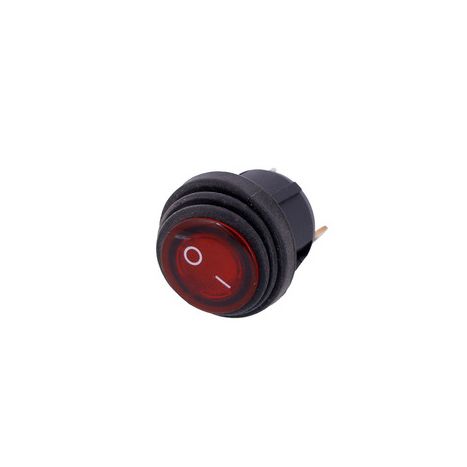
Single network button 40321
We present to you the single network button 40321 with a diameter of 20 mm and 3 contacts, which will be a reliable solution for controlling your electrical appliances. This button features high protection and ease of use thanks to the built-in LED and dust cover.
Product description
The control button is designed for connection to electrical circuits, providing reliable and safe switching on and off of devices. Its unique design and high-quality materials make this button ideal for use in various conditions.
Technical specifications
| Parameter | Value |
|---|---|
| Type | Control button |
| Rated current and voltage | 6 A(10 A)/~250 V(125 V) |
| Number of positions | 2 |
| Degree of protection | IP55 |
| Connection | Terminal 4.8 mm - 3 pcs. |
| Dimensions (HxWxD) | 25x25x34 mm |
| Mounting diameter | 20 mm |
| Mounting depth (excluding terminals) | 16 mm |
| Material | Plastic |
| Country of manufacture | China |
Compatibility
The 40321 button is designed for wide application in household and industrial electronics. Before purchasing, ensure that it fits your device in terms of size and specifications.
How to choose the right button
- Check dimensions: Make sure the mounting diameter of the button matches the size of the hole in your device.
- Check contacts: Ensure that the number of contacts and their type match your old button.
- Rated specifications: Verify that the button supports the necessary current and voltage for your device.
Causes of button failure and prevention
- Frequent use can lead to wear of the mechanism. It is recommended to use the button within its rated specifications.
- Dirt and moisture can damage the contacts. Use the button with IP55 protection to guard against external factors.
- Improper installation can lead to failure. Ensure that the button is installed correctly and securely fastened.
Recommendations for button replacement
- Turn off the power to the device before starting work.
- Remove the old button by carefully disconnecting the wires from the contacts.
- Install the new button in place of the old one, ensuring all contacts align.
- Secure the button and reassemble the device.
- Turn on the power and test the operation of the new button.
Difficulty rating for replacement
Replacing the 40321 button is a simple task that can be performed by anyone with basic electronics skills. The process usually takes no more than 15-30 minutes.
Remember to follow all instructions and recommendations for a safe and quality replacement of the part!