


|
Quantity
|
Out of stock
|
||
|
|
|||
|
|
|||
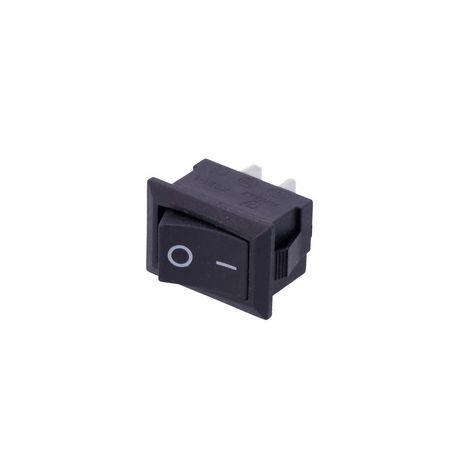
Single network button 40305
The single network button 40305 is a reliable component designed for controlling electrical devices. It features compact dimensions and high performance, making it an ideal choice for various home and professional applications.
Technical specifications
| Parameter | Value |
|---|---|
| Type | Control button |
| Rated current and voltage | 6 A(10 A)/~250 V(125 V) |
| Number of positions | 2 |
| Protection class | IP22 |
| Connection | Terminal 4.8 mm - 2 pcs. |
| Dimensions (HxWxD) | 21x15x26 mm |
| Mounting dimensions (HxWxD) | 19x12x11 mm |
| Material | Plastic |
| Country of manufacture | China |
Compatibility
The 40305 button has a wide range of applications and is compatible with various electrical devices where button control is required. Before purchasing, ensure that the dimensions and technical specifications meet your requirements.
How to choose the right part
To avoid mistakes when selecting a button, pay attention to the following points:
- Rated current and voltage: Ensure that the button is suitable for your device.
- Dimensions: Check the overall dimensions and mounting sizes to ensure the button fits correctly.
- Protection class: If the button will be used in high humidity conditions, choose components with the appropriate protection class.
Causes of failure and prevention
The main causes of button failure may include:
- Current overload: Use the button within its rated specifications.
- External mechanical damage: Install the button in a protected location.
- Contact oxidation: Periodically check and clean the contacts from contaminants.
To prevent damage to the button, avoid frequent switching under high load conditions and use protective devices.
Replacement recommendations
Replacing the 40305 button is quite simple and can be done by yourself. Follow these steps:
- Disconnect the device from the power supply to avoid electric shock.
- Remove the old button by carefully disconnecting the wires from the terminals.
- Connect the new wires to the new button, following the wiring diagram.
- Ensure that all connections are secure and tight.
- Install the button in place and check the device's functionality.
Replacement difficulty
The difficulty level of replacing the button is Low. The process does not require special skills and can be performed at home.