


|
Quantity
|
Out of stock
|
||
|
|
|||
|
|
|||
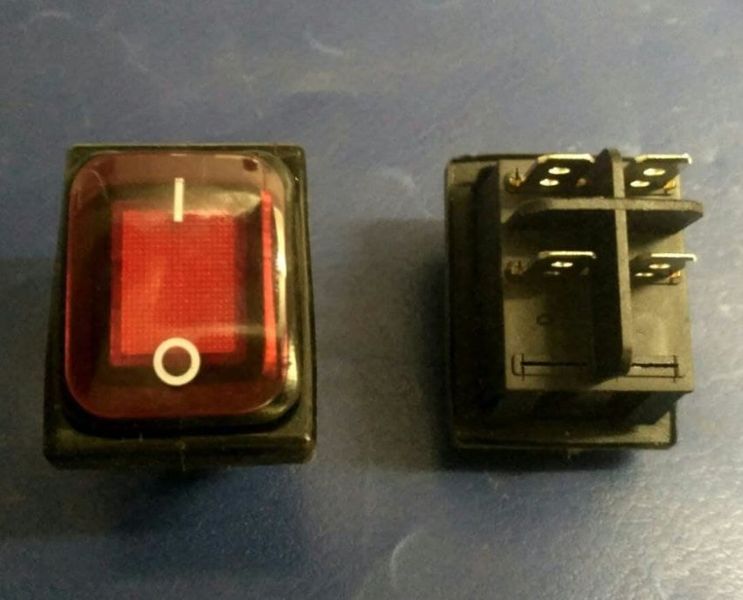
Network button for oil heater FILN SWT-009
SWT-009 network button is designed to control electric heaters, providing reliable on and off operation of the device. This button features 4 contacts and supports a current of up to 16A, making it an ideal solution for FILN oil heaters. The red color of the button ensures good visibility, allowing for easy location in the dark.
Technical specifications
| Specification | Value |
|---|---|
| Model | SWT-009 |
| Contacts | 4 |
| Maximum current | 16A |
| Color | Red |
Selection tips
When selecting a network button, pay attention to the following points:
- Ensure that the button model matches your heater model.
- Make sure the button supports the required current and voltage.
- Check the number of contacts to avoid mismatches with your wiring scheme.
Possible causes of malfunction and prevention methods
Causes of button malfunction may include:
- Overheating due to exceeding the allowable current.
- Contact wear from prolonged use.
- Moisture or dirt ingress that can cause a short circuit.
To prevent wear, it is recommended to:
- Regularly check the condition of the button and replace it at the first signs of damage.
- Do not exceed the allowable current to avoid overheating.
- Keep the button clean and protect it from moisture.
Replacement difficulty
Replacing the SWT-009 network button is of medium difficulty. Below are the main steps for its replacement:
- Disconnect the heater from the power supply.
- Remove the cover to access the internal components.
- Disconnect the old button from the wires, noting their arrangement.
- Connect the new button following the wiring diagram.
- Ensure all connections are secure and replace the cover.
- Reconnect the heater to the power supply and test the button's operation.
It is recommended to consult professionals if you lack experience with electrical devices.