


|
Quantity
|
Out of stock
|
||
|
|
|||
|
|
|||
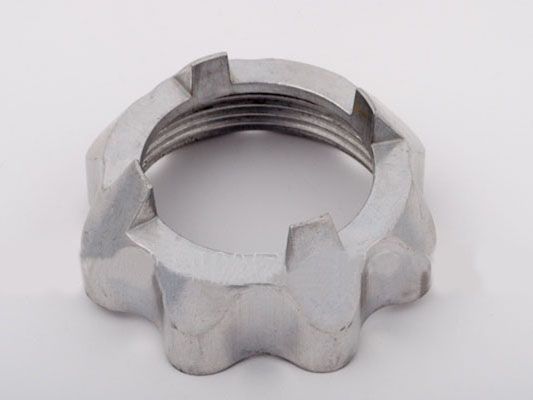
Nut for Panasonic meat grinder tube (AME02-107)
The nut for the Panasonic meat grinder tube (AME02-107) is an essential part that ensures a secure connection between the tube and the meat grinder. This nut is designed for models in the MK series and plays a key role in the food grinding process, facilitating the proper movement of ingredients within the device's mechanism.
Technical specifications and compatibility
| Specification | Value |
|---|---|
| Manufacturer | Panasonic |
| Part number | AME02-107 |
| Compatible models |
|
How to choose the right part
When selecting a nut for the meat grinder tube, ensure that you check the following:
- Compatibility with your meat grinder model. Make sure your meat grinder model is listed among the compatible ones.
- The part number (AME02-107) should match the number specified in your meat grinder's documentation.
- The condition of your current nut. If the nut is damaged or worn, it is advisable to replace it with a new one.
Possible causes of failure and prevention methods
The nut may fail for the following reasons:
- Wear and tear from frequent use.
- Damage from improper installation or excessive force during tightening.
To prevent premature wear of the nut, follow these recommendations:
- Regularly inspect the nut for damage.
- Avoid over-tightening during installation.
- Use the meat grinder according to the manufacturer's instructions.
Difficulty of part replacement
Replacing the nut for the Panasonic meat grinder tube (AME02-107) is a relatively simple task that can be done independently. Here are the steps for replacement:
- Unplug the meat grinder for safety.
- Remove the meat grinder tube by carefully unscrewing the nut.
- Install the new nut (AME02-107) in place.
- Secure the tube, ensuring that the nut is tightened securely but not overly so.
- Plug in the meat grinder and check its operation.
Overall, the replacement process will take no more than 15-20 minutes and does not require special tools.